
CloudHub to CloudHub 2.0 Migration Configuration
Migrate your CloudHub configurations to CloudHub 2.0 by following critical steps, handling customizations, and ensuring all configuration dependencies resolve correctly. This process reduces risks and keeps your systems compliant and efficient.
Understand the Differences
Identify critical architectural differences and configuration gaps between ClouHub and CloudHub 2.0. Review deployment models and environmental dependencies that affect custom configurations. Use this information to accurately scope the migration effort and reduce incompatibility risk during upgrade planning.
Infrastructure and Networking Differences
Architecture
| CloudHub | CloudHub 2.0 |
|---|---|
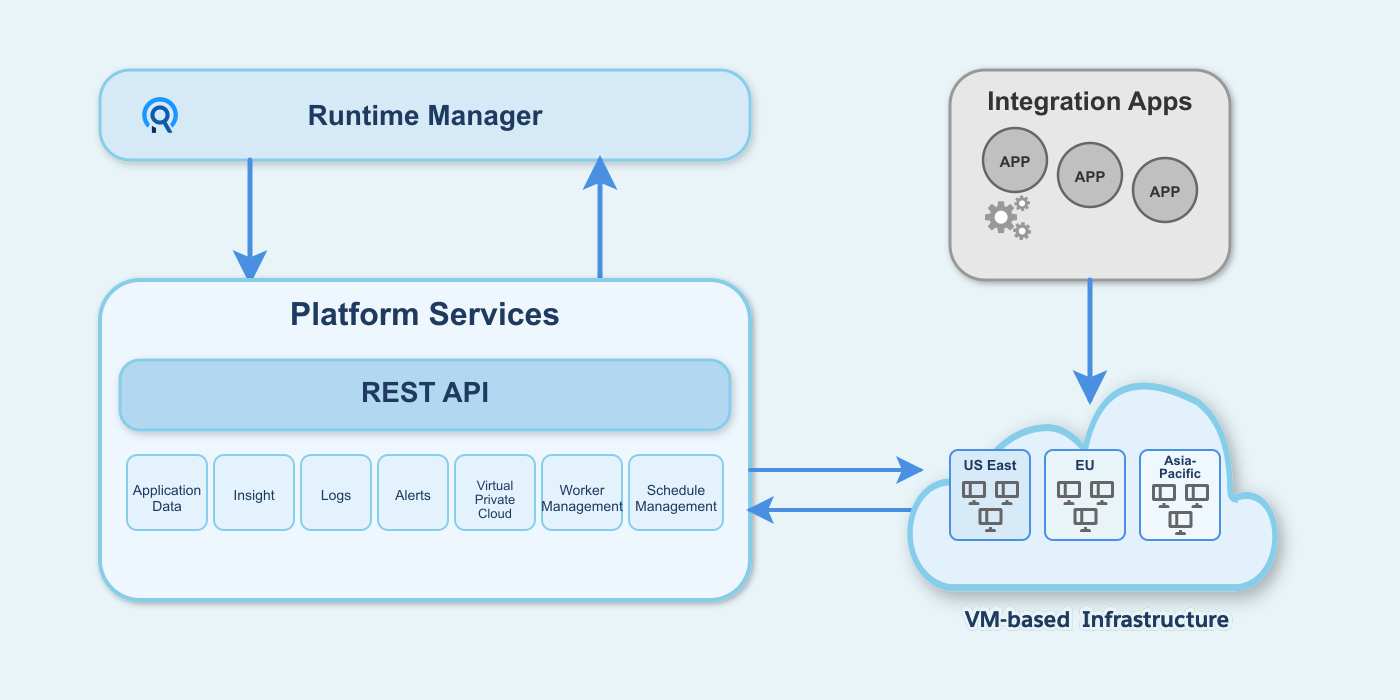
The CloudHub architecture includes two major components: Anypoint Platform services and a multitenant cloud of virtual machines distributed across global regions where your applications run. Individual instances of an application are called workers. CloudHub uses a VM-based infrastructure. |
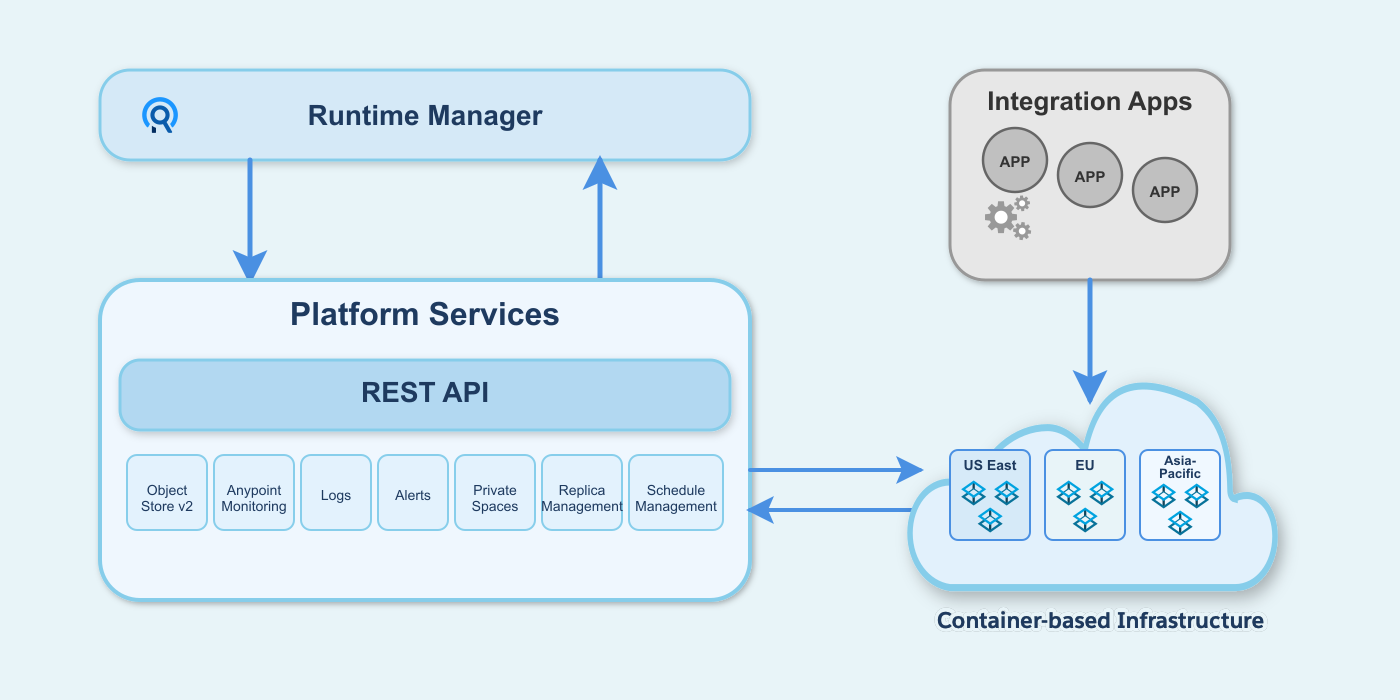
The CloudHub 2.0 architecture includes two major components: Anypoint Platform services and a multitenant cloud of containerized replicas distributed across global regions where your applications run. Individual instances of an application are called replicas. CloudHub 2.0 uses a container-based infrastructure. |
|
|
Private Network
The Private Network extends your corporate network and helps CloudHub workers and CloudHub 2.0 replicas to access resources behind the corporate firewall. Creating a private network differs between CloudHub and CloudHub 2.0.
| CloudHub | CloudHub 2.0 |
|---|---|
A Virtual Private Cloud (VPC) is a virtual, private, and isolated cloud network segment for hosting CloudHub workers. |
A private space is a virtual, private, and isolated logical space in CloudHub 2.0 for running Mule apps. |
Static IPs are managed per application, not at the VPC level. Turn on Static IPs for individual apps to receive their own set of egress static IPs. |
Static IPs are provisioned at the private space level. All applications in the same private space share these outbound static IPs. |
CloudHub provides a Shared Load Balancer (SLB) by default for all apps. The Dedicated Load Balancer (DLB) is optional, and you create and configure it within the VPC. |
CloudHub 2.0 automatically provisions a fully managed ingress load balancer for the private space. |
TLS/SSL certificates require manual configuration. The SLB uses the platform’s wildcard certificate. For custom domains, create a DLB and upload PEM-encoded certificates and private keys. |
CloudHub 2.0 automatically creates a default TLS context for the private space with wildcard certificates for both internal and public endpoints. You can configure custom vanity domains with your own TLS context for both internal and external endpoints. |
Connectivity Methods
The private network connects to the corporate network using these connectivity methods:
| CloudHub | CloudHub 2.0 |
|---|---|
|
|
Contact the MuleSoft Support team to enable VPC peering and AWS Direct Connect. |
CloudHub 2.0 supports Transit Gateway or VPN tunnel. |
Firewall Rules
| CloudHub Ingress (Inbound) Rules | CloudHub 2.0 Ingress (Inbound) Rules |
|---|---|
CloudHub adds firewall rules automatically when you create a VPC. |
CloudHub 2.0 adds firewall rules automatically when you create a private space. |
By default, all traffic to a VPC is blocked unless explicitly allowed by a firewall rule. However, CloudHub automatically creates four default inbound firewall rules when you create a VPC. |
Traffic to a private space is blocked unless explicitly allowed by a firewall rule. |
CloudHub creates four default inbound rules automatically:
|
CloudHub 2.0 creates two default inbound rules automatically:
|
CloudHub supports HTTP, HTTPS, and TCP protocols. The Dedicated Load Balancer (DLB) also supports WebSockets (ws and wss). |
CloudHub 2.0 supports HTTP, HTTPS, and TCP protocols. The upgrade tooling does not support TCP traffic migration yet. |
The maximum number of firewall rules is approximately 35 per VPC, depending on the number of rules CloudHub requires. |
The maximum number of inbound firewall rules is 300. |
| Egress (Outbound) Rules |
|---|
CloudHub doesn’t support egress firewall rules. It allows all outbound traffic by default. |
CloudHub 2.0 creates two default outbound rules automatically. You can configure additional rules and application-level egress rules for granular control. The maximum number of outbound firewall rules is 300. |
CloudHub 2.0 adds two egress rules by default. You can delete these rules if you want to block all outbound traffic for security reasons:
|
| CloudHub 2.0 Application-Level Egress Rules |
|---|
CloudHub 2.0 supports egress firewall rules at the application level. Application-level egress rules are independent of private-space-level firewall rules. See Configuring Application-Level Egress Rules. |
Turn on application-level egress rules in Runtime Manager. |
In CloudHub 2.0, egress traffic passes through both application-level control (enforced first) and private-space-level control (enforced after application-level control). |
Apply application-level egress rules when you deploy your application. See Apply Application-Level Egress Rules. |
You can configure application-level egress connections, such as:
|
Static IP Addresses
| CloudHub | CloudHub 2.0 |
|---|---|
CloudHub supports static IP addresses at the application level. |
CloudHub 2.0 supports static IP addresses at the private space level. |
If you turn on Static IPs for an application, CloudHub provides outbound static IPs. |
CloudHub 2.0 provides inbound and outbound static IPs at the private space level. |
Applications deployed to the same VPC don’t automatically share static IPs. If you turn on Static IPs for an application, it receives its own set of outbound static IPs. Inbound static IPs are available only through a DLB, and all applications behind the same DLB share them. |
Applications deployed to the same private space use the same set of inbound and outbound static IPs. To have unique static IPs per application, use a different private space. |
Load Balancing
| CloudHub | CloudHub 2.0 |
|---|---|
CloudHub provides two types of load balancing:
|
CloudHub 2.0 automatically provides a fully managed ingress load balancer for each private space with a simplified architecture that removes the need to select or create load balancers. |
CloudHub load balancers provide round-robin load distribution across workers. |
CloudHub 2.0 provides a fully managed ingress load balancer for each private space that automatically balances inbound traffic across multiple application replicas. The ingress load balancer auto-scales to accommodate traffic. You can configure this load balancer to meet your specific requirements. |
CloudHub doesn’t support load balancer logs for the DLB. The SLB has no log access. |
Download ingress traffic logs from Runtime Manager for full visibility into ingress traffic and troubleshooting. |
You can assign up to four load balancer units (up to eight workers total) to a Dedicated Load Balancer (DLB) for high availability and load distribution. The Shared Load Balancer (SLB) provides fully managed high availability with no customer configuration required. |
CloudHub 2.0 automatically distributes application replicas across two or more availability zones (AZs) for built-in high availability and fault tolerance. If you use the VPC upgrade tool, the private space inherits the same number of AZs as the original CloudHub VPC. |
Domains and TLS Context
| CloudHub | CloudHub 2.0 |
|---|---|
SSL termination happens at the DLB layer. |
SSL termination happens at the ingress load balancer layer. |
The communication between the DLB and the Mule application is internal to the VPC. |
Applications inside a private space communicate using the ingress load balancer via the internal endpoint. This depends on the application protocol. |
Supported protocols:
|
|
An application can have multiple endpoints, depending on the domain and TLS context configuration. |
Mutual TLS
| CloudHub | CloudHub 2.0 |
|---|---|
CloudHub doesn’t provide native mutual TLS (mTLS) capability. The Dedicated Load Balancer (DLB) handles mTLS at the infrastructure level, performing client certificate validation and forwarding certificate information to applications via HTTP headers. |
CloudHub 2.0 provides native mTLS with TLS contexts and truststores. Configure mTLS at the private space level with centralized management. CloudHub 2.0 also supports forward SSL, which forwards client certificate information to applications via HTTP headers. |
CloudHub supports limited Certificate Authority (CA) certificates through the DLB. It accepts certificate files in PEM format only. |
CloudHub 2.0 provides dynamic certificate management, application-level truststore access, and in-place updates without redeployment. Upload truststore files in PEM and JKS formats. |
URL Rewriting
| CloudHub | CloudHub 2.0 |
|---|---|
Implement URL rewriting at the DLB level using mapping rules. Configure a DLB to use this feature. |
Implement URL rewrite at the application level using domains and endpoints for a more flexible, per-app configuration. |
Internal Application Communication
| CloudHub | CloudHub 2.0 |
|---|---|
The internal worker hostname |
Use one of these three options:
|
Application Differences
Persistent VM Queues Vs. Anypoint MQ
| CloudHub | CloudHub 2.0 |
|---|---|
CloudHub persistent queues store VM queue messages externally to the application. Use this feature mainly with VM components. Turn on CloudHub persistent queues on a per-application basis. |
Anypoint MQ provides persistent message storage in cloud infrastructure, eliminating VM-dependent queue management. Anypoint MQ provides asynchronous message processing, event-driven architectures, and cross-application communication. Configure Anypoint MQ on a per-application basis with automatic scaling and high availability. |
Logging
| CloudHub | CloudHub 2.0 |
|---|---|
During deployment, CloudHub automatically replaces the application archive’s |
CloudHub 2.0 merges the |
Download the application and runtime logs separately. |
CloudHub 2.0 merges application and runtime logs into a single log stream. To find runtime logs, download the application log and check for runtime-related messages. |
CloudHub stores logs in the region where it was first deployed. If you move the app to another region, the logs remain stored in the initial deployment region. To reset this log retention configuration, delete and re-create the app. |
CloudHub 2.0 stores logs in the region where the application is currently deployed. You can’t move the app to a different region once deployed. To reset this log retention configuration, delete and re-create the app. |
CloudHub has limited control over log forwarding. |
If you deselect Forward application logs to Anypoint Platform within the app configuration in Runtime Manager:
This provides more granular control over platform log forwarding. |
For more information, see CloudHub 1.0 Logging FAQ |
For more information, see CloudHub 2.0 Logging FAQ |
Known Issue: Scheduler Concurrent Execution
| CloudHub | CloudHub 2.0 |
|---|---|
For affected applications, CloudHub prevents overlapping executions of the same Scheduler even when the Scheduler source’s |
CloudHub 2.0 honors the |
This issue applies only when you migrate an application from CloudHub to CloudHub 2.0. Review each Scheduler that has a small interval, such as less than one second, and can run longer than its configured interval, when disallowConcurrentExecution is false or omitted. CloudHub 2.0 can start overlapping executions that consume the application thread pool shared by all flows. Excessive queued executions can delay or prevent other flows from running.
To prevent overlapping executions after migration, explicitly set disallowConcurrentExecution="true". If a trigger becomes due while the previous execution is still running, CloudHub 2.0 skips that trigger and tries again at the next configured interval.
When an affected Scheduler has a very short interval, skipped triggers can generate excessive INFO-level log messages. To suppress INFO-level messages from org.mule.runtime.core.internal.source.scheduler.DefaultSchedulerMessageSource, including the repeated Execution skipped message, set its log level to WARNING in the application’s Monitoring tab. Applying the log-level change restarts the application. For instructions, see Configure Log Levels and Categories.
For more information about the Scheduler source setting, see Scheduler.
Deployment Configuration
| CloudHub | CloudHub 2.0 |
|---|---|
Use maven and |
App deployment with maven and
For more information, see Deploy Applications to CloudHub 2.0 Using the Mule Maven Plugin. |
The maximum size of a Mule application (ZIP or JAR) file is 200 MB. |
The maximum size of a Mule application JAR file is 350 MB. |
Names are unique per control plane. |
Names are unique per private space. CloudHub 2.0 adds a six-character unique ID to the application name that you specify in the public endpoint URL:
|
The DLB supports a maximum HTTP POST (payload) size of 200 MB. |
The maximum HTTP request size is 1 GB. |
vCore Sizes
| CloudHub | CloudHub 2.0 |
|---|---|
See CloudHub Workers. |
CloudHub 2.0 provides a more granular resource capacity for applications. You can assign specific vCore increments (including 0.5, 1.5, 2.5, 3, 3.5, and 4). This granularity helps match processing needs precisely and avoids forcing a jump from 0.2 to 1 vCores. Replicas with fewer than 1.0 vCores offer limited CPU and I/O suitable for smaller workloads, while those with one or more vCores provide performance consistency.
Worker Vs. Replica
| CloudHub | CloudHub 2.0 |
|---|---|
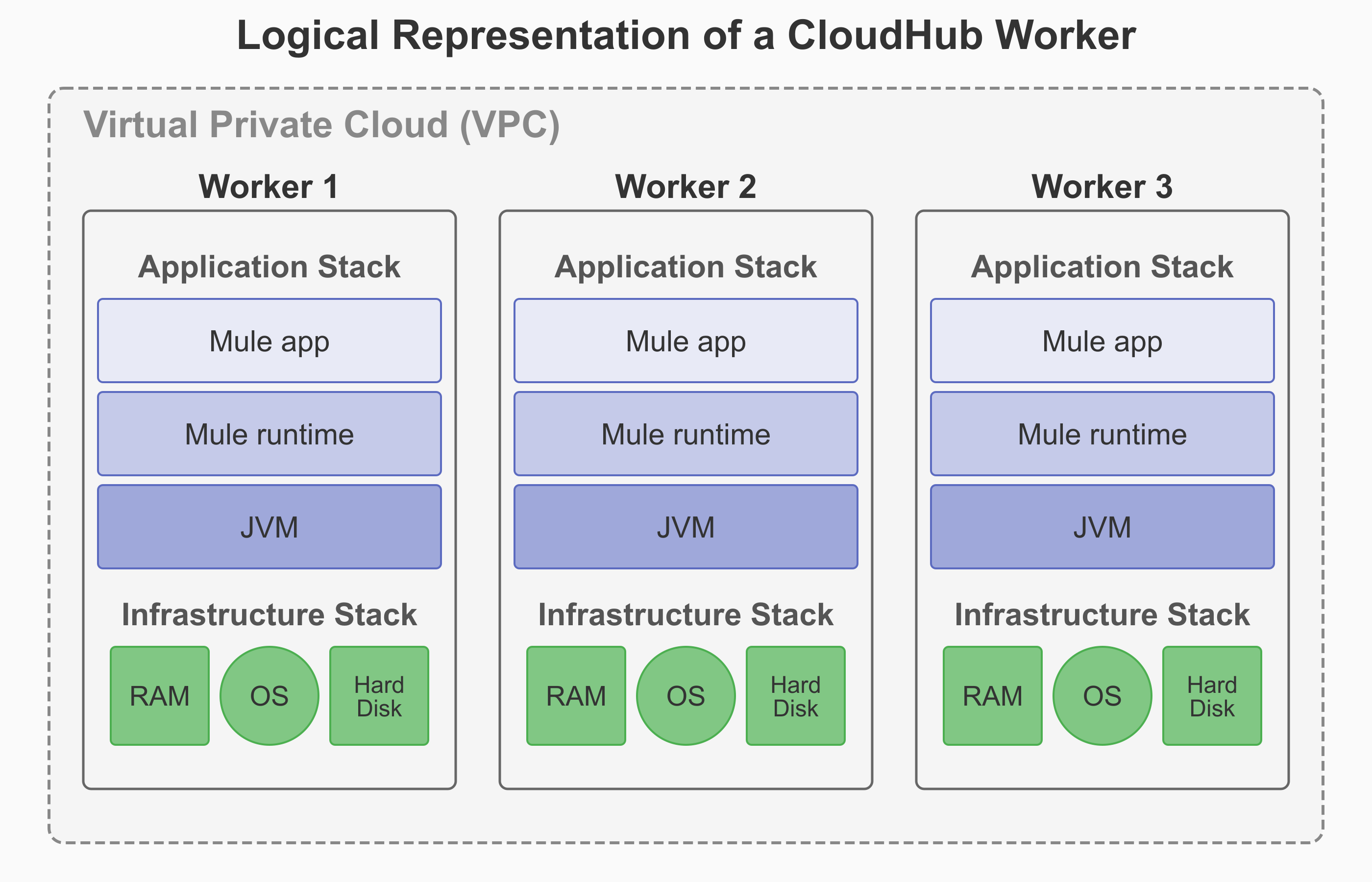
A worker in CloudHub is a dedicated Amazon Elastic Compute Cloud (EC2) virtual machine instance that runs your Mule application. It functions as a full, independent virtual server with its own operating system, memory, CPU resources, and isolated runtime environment. |
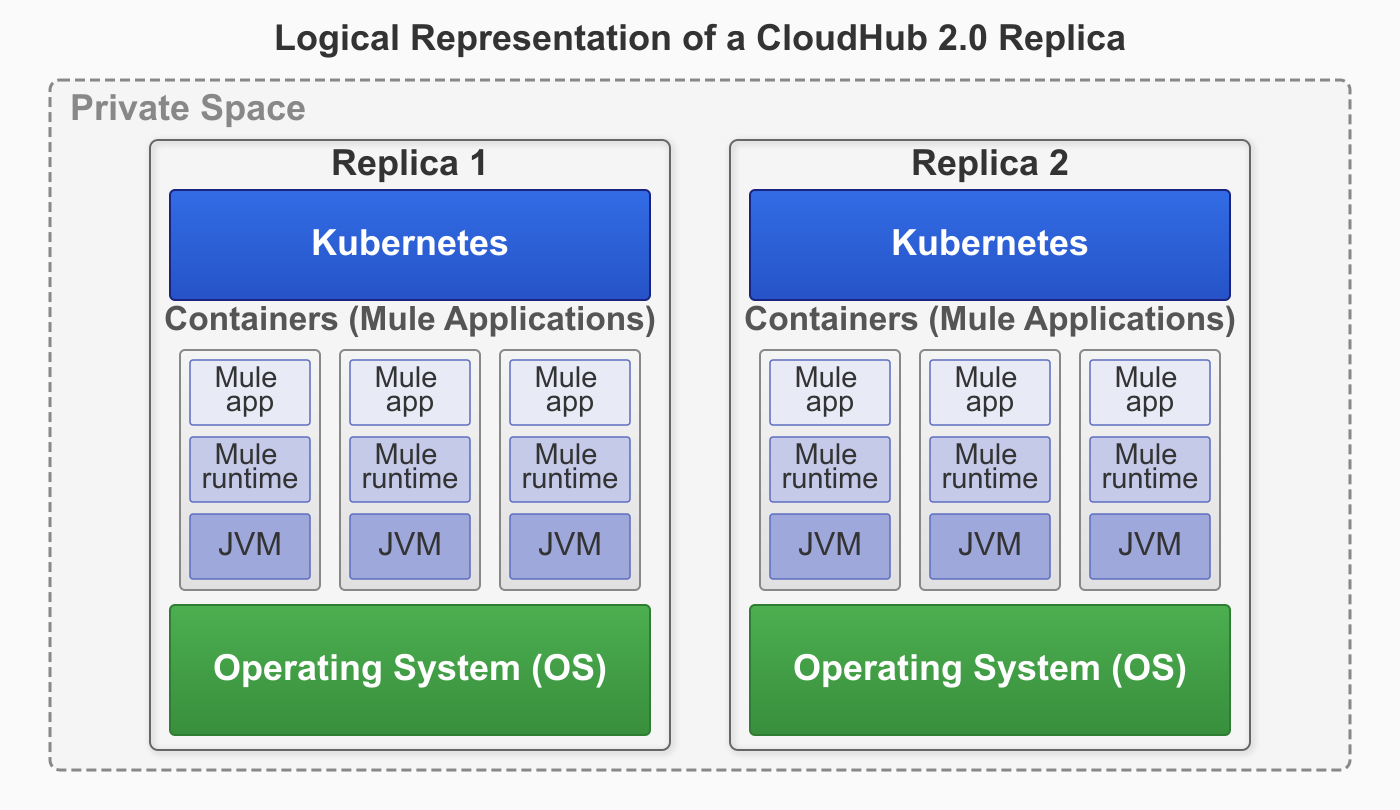
A replica in CloudHub 2.0 is a dedicated, containerized instance of Mule runtime engine that runs your integration application. Each replica provides complete isolation between applications with its own isolated environment, allocated memory (heap and total), CPU resources (vCores), and storage capacity. |
If you select Automatically restart application when not responding, CloudHub monitors the worker and automatically restarts the application if necessary. |
CloudHub 2.0 provides self-healing capabilities that automatically recover applications from both Mule process failures and underlying infrastructure failures. If either the Mule process or the infrastructure fails, CloudHub 2.0 automatically restarts the application on healthy infrastructure without your intervention. Application crash recovery is enabled by default. |
|
|
High Availability with Clustering
| CloudHub | CloudHub 2.0 |
|---|---|
CloudHub doesn’t support Mule clustering. You can run multiple workers for scale and High Availability (HA), but they’re independent runtimes without cluster semantics. There’s no distributed in-memory state or cluster-aware components. |
CloudHub 2.0 supports Mule clustering. Multiple replicas of the same app form a managed cluster, enabling cluster-aware runtime behavior. This includes shared memory and distributed locking across runtime replicas, with a single primary replica running the application logic and secondary replica(s) available for high-availability if the primary goes down. |
CloudHub scales applications by deploying multiple workers (up to eight) for each application. The SLB automatically distributes traffic across these workers. For applications that need shared state, store that state externally (for example, in a database or Object Store). Workers can’t share in-memory state. |
CloudHub 2.0 scales applications by deploying multiple replicas (up to sixteen) for each application. The platform’s cluster mode coordinates behavior across these replicas automatically. For applications with stateful requirements, use Mule’s native clustered features (such as clustered object stores and clustered caches) to maintain state across replicas. |
CloudHub achieves HA with two or more workers. It supports availability across AZs, and the platform handles failover. |
CloudHub 2.0 provides fully managed HA. The platform automatically spreads replicas across two or more AZs, with round-robin HTTP load balancing and cluster-aware recovery. If you use the VPC upgrade tool, the private space inherits the same number of AZs as the original CloudHub VPC. |
CloudHub monitors workers and automatically performs restarts. Blue-green deployment at the DLB or SLB layer provides seamless cutover, but this process lacks cluster draining and coordination within the runtime. |
CloudHub 2.0 provides orchestrated restarts and rolling updates across replicas. Cluster-aware coordination minimizes impact during upgrades and failures. |
You manage worker counts and rely on external stores for shared state. |
CloudHub 2.0 provides fully managed clustering. Select replica counts, and the platform handles cluster formation, health, placement, and recovery. |
Runtime Manager Differences
Alerts
| CloudHub | CloudHub 2.0 |
|---|---|
CloudHub triggers custom alerts when your application sends notifications to Runtime Manager using Anypoint Connector for CloudHub (CloudHub Connector). For more information, see Custom Application Alerts. |
CloudHub 2.0 enables application deployment success and failure alerts. For custom alerting, CloudHub 2.0 leverages Anypoint Monitoring Alerts For more information, see Configuring Application Alerts. |
Migrate Your CloudHub Applications to CloudHub 2.0
Migrate your CloudHub applications to CloudHub 2.0 by gathering reusable artifacts, creating private spaces, and updating application configurations. Collect CIDR blocks, VPN connections, SSL certificates, and firewall rules from your existing CloudHub environment. Update Mule runtime versions to a supported runtime version. If you are using persistent queues and CloudHub connectors, modify application code to remove them. Deploy applications using the two-step process through Anypoint Exchange and configure egress firewall rules for Mule services access.
Before You Begin
Gather the required information to set up a private space and use your CloudHub reusable artifacts to configure the CloudHub 2.0 environment:
-
CIDR block information
If you require both CloudHub and CloudHub 2.0 to exist at the same time on the same network, use a new CIDR block for CloudHub 2.0.
-
VPN connection information
-
SSL certificates
-
DNS server information
-
Ingress firewall rules
-
Mule application code
For more information, see Information Required to Set Up a Private Space.
Create Your Private Space
-
If you’re using DLB, configure custom TLS certificates in your private space.
-
Create and configure your CloudHub 2.0 private space using one of these methods:
-
Anypoint Runtime Manager
Update the Mule Runtime Version
CloudHub 2.0 supports Mule runtime versions 4.3.x and later. Upgrade to a supported Mule runtime version.
Update the Mule Application Code
-
Update the application’s
pom.xmlwith CloudHub 2.0 deployment configuration. See Deploy to CloudHub 2.0. -
Update the application’s
log4j2.xmlwith log forwarding options if needed. See Integrate with Your Logging System Using Log4j. -
Review Scheduler configurations for the known Scheduler concurrent-execution issue.
-
Remove persistent queues and implement AnypointMQ.
-
Remove CloudHub Connector and replace with custom logic.
Deploy your Application
-
If you’reusing DLB, configure application mapping rules via path and path rewrite configurations for endpoints in the application deployment.
-
Publish your application to Anypoint Exchange.
-
Deploy your application to your CloudHub 2.0 private space. See Deploy to a Private Space.
-
Configure required egress firewall rules to access other Mule services, such as API Manager, ObjectStore, and Anypoint MQ. See Configure an Application-Level Egress.
-
Update CI/CD scripts to support the two-step deployment process.
Review CloudHub 2.0 Limitations
Before finalizing the migration, review the CloudHub 2.0 Limitations.